Features
A broad DAW feature set, with deeper workflows where they matter.
OpenStudio covers the expected ground, then goes deeper with a built-in NAM A1/A2 guitar rig, optional AI tools, pitch editing, native plugin windows, detached mixing, and scripting in one production environment.
- Built-in NAM A1/A2 rig
- Optional AI tools
- Graphical pitch editing
- Detached mixer workflow
- Native plugin windows
- Lua scripting
A fair category comparison
OpenStudio compared with AmpliTube, Guitar Rig, and Neural DSP.
People looking for an AmpliTube alternative, a Guitar Rig alternative, or a Neural DSP alternative are often comparing different product shapes, not just tones. AmpliTube CS and Guitar Rig Player have useful free editions, while Neural DSP offers trials. OpenStudio's distinction is that its complete open-source NAM Rack and the recording, arranging, mixing, automation, and rendering workflow remain free together.
| Capability | OpenStudio NAM Rack | AmpliTube 5 / CS | Guitar Rig 7 / Player | Neural DSP plug-ins |
|---|---|---|---|---|
| Product shape | Guitar rack inside a full DAW project. | Standalone and plug-in guitar/bass suite with a focused recorder. | Modular standalone and plug-in amp/effects rack. | Separate artist, amp, and bass suites in standalone or plug-in form. |
| Base cost / free limit | Free and open source; no paid NAM Rack tier. | CS is permanently free with limited gear and a 2-track recorder; paid editions expand both. | Player is free with 2 amps, 26 effects/tools, and 60 presets; Pro is paid. | Paid per title, with unrestricted 14-day trials and no permanent free plug-in tier. |
| Open source | Yes. OpenStudio is AGPLv3; the NAM core is MIT-licensed. | No; proprietary. | No; proprietary. | No public open-source release. |
| Native NAM A1/A2 | Yes—local A1 and A2 amp-only or full-rig .nam models. | No vendor-documented native .nam A1/A2 import; TONEX uses IK Tone Models. | No vendor-documented native .nam A1/A2 import. | No vendor-documented native .nam A1/A2 import. |
| Custom capture / IR | Loads local .nam captures and local cabinet IRs; it is a player, not a capture trainer. | Loads TONEX Tone Models; capture creation uses TONEX Modeler. Custom IR loading starts above CS. | No user amp-capture importer; custom cabinet IR loading is Pro-only. | Curated amp rigs per title; guitar and bass plug-ins support custom IRs. |
| Pedals / effects | Native pre-pedals, cabinet shaping, EQ, modulation, delay, reverb, and shimmer. | Large stomp, rack, room, cabinet, and mixer-effect ecosystem; CS includes a subset. | Flexible modular chains; Player is limited while Pro carries the larger catalog. | Polished title-specific pedals, amps, cabinets, and studio effects. |
| Full DAW context | Yes—multitrack recording, arranging, editing, routing, mixing, automation, and offline render. | Focused 2-/8-track guitar recorder rather than a general-purpose production DAW. | No full DAW; recording and production need a host. | No full DAW; recording and production need a host. |
| Account / activation | No OpenStudio license account or activation. A TONE3000 account is optional for that integration. | IK account plus product registration and authorization. | Native ID and Native Access for download and activation. | Neural DSP account linked to iLok activation. |
| Where the commercial option wins | Trade-off: younger implementation, fewer bundled licensed tones and presets, and less mature commercial support. | Large branded catalog, deep cabinet/mic routing, TONEX/ToneNET, controller workflows, and paid support. | Mature modular UX, broad Pro catalog, established presets, looper, and ecosystem. | Highly curated artist/brand suites, polished presets, focused support, and Cortex compatibility for supported titles. |
Comparison checked 27 July 2026 from current vendor documentation. Product names are used only for factual comparison; OpenStudio is not affiliated with IK Multimedia, Native Instruments, Neural DSP, or TONE3000.
Optional account delivery
Reach TONE3000 without turning its catalog into ours.
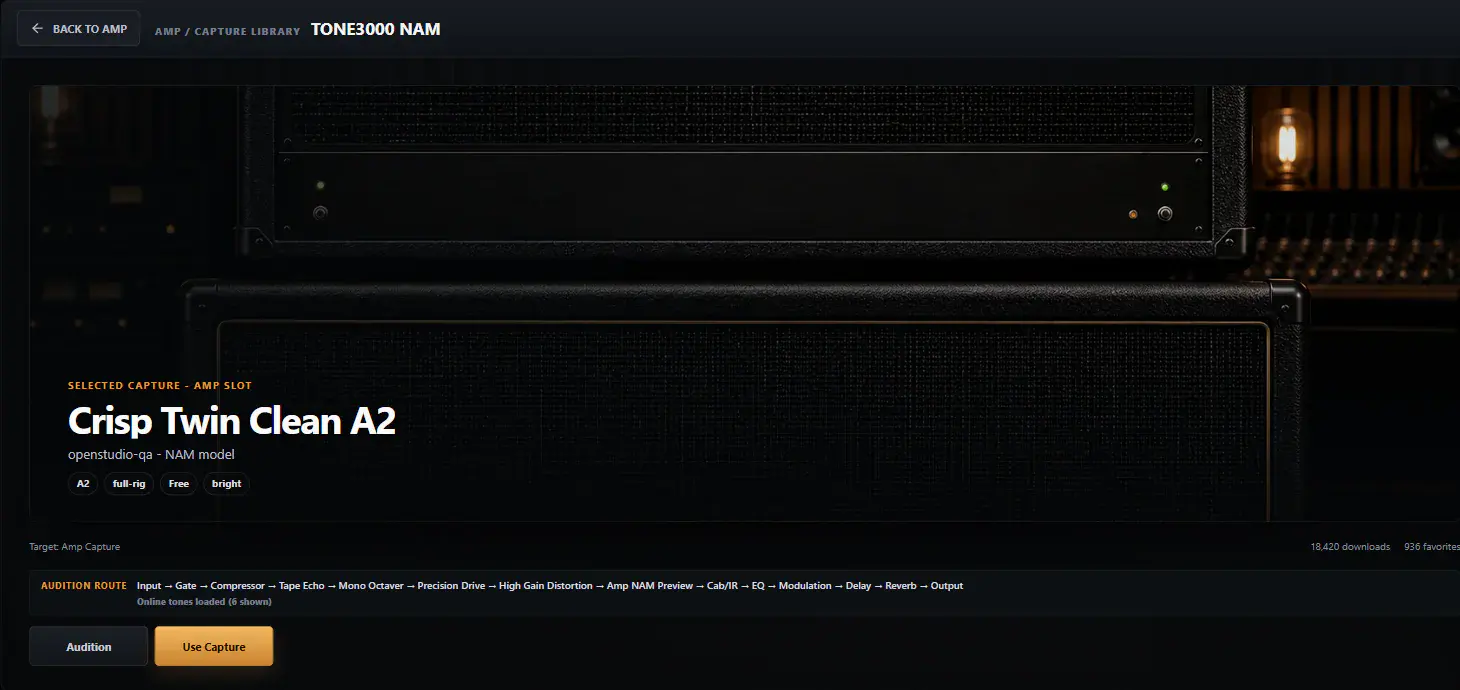
Sign up or sign in through TONE3000’s browser-based OAuth flow, then request A1/A2 captures from the current Latest, Trending, and Downloaded online views. Installed captures and Favorites remain available as local library views, with creator attribution and license context visible.
- A TONE3000 account is required only for authenticated TONE3000 delivery.
- Requested downloads come from TONE3000; OpenStudio does not bulk-download, mirror, proxy, or re-host the catalog.
- Richer catalog search is not promised unless TONE3000 confirms that endpoint scope for OpenStudio in writing.
OpenStudio feature map
Recording
Capture stays close to the timeline and transport, so the first pass from input to take does not feel detached from the rest of the session.
Native multitrack recording
Record directly into a multitrack project with the arrange view and transport still in front of you.
Track arm and input monitoring
Arm tracks, monitor inputs, and keep recording decisions tied to the project instead of a hidden setup layer.
Audio device and I/O control
Configure driver, sample rate, buffer size, and I/O routing from the app's device settings.
Metronome, tempo, and loop control
Keep timing, click, and loop setup within the same session workflow while writing or tracking.
Editing
OpenStudio keeps editing practical and visible so arrangement cleanup and clip-level decisions can happen quickly under real session pressure.
Timeline editing
Trim, split, move, duplicate, fade, and align clips in a canvas timeline built for direct manipulation.
Markers, regions, and navigation
Organize the session with markers and regions while keeping the bigger song structure readable.
Clip properties and detail control
Adjust clip name, fades, mute, lock, and related properties without leaving the project context.
Undo, redo, and command-driven workflow
Use undo history, keyboard shortcuts, and a command palette to keep editing fast and recoverable.
MIDI & Instruments
The MIDI side is not a bolt-on afterthought. It lives alongside audio tracks as part of the same production environment.
MIDI tracks and clips
Write and arrange MIDI inside the same project as recorded audio and plugin-based instruments.
Piano roll editing
Edit note timing, placement, and structure in the piano roll without breaking the larger arrangement view.
Virtual keyboard and MIDI devices
Use hardware MIDI input or the on-screen keyboard when you want ideas to move into the session quickly.
Instrument track workflow
Create instrument tracks and load virtual instruments inside the same track-and-mixer ecosystem as audio.
Mixing
Mix decisions stay readable because the mixer is treated like a real working surface, not a simplified afterthought.
Channel strips and metering
Read levels, balance tracks, and inspect channel state in a mixer built around real mix feedback.
Detached mixer workflow
Keep the mixer open in its own window when you want mixing and arranging visible at the same time.
Master bus control
Control master volume, pan, mono state, and master FX as part of the same mix workflow.
Mix-ready session control
Use solo, mute, grouping, automation visibility, and track selection tools without leaving the mixer context.
Routing & Monitoring
Signal flow matters. OpenStudio exposes the practical routing and monitoring pieces that keep a project usable as it grows.
Input FX, track FX, and master FX
Process audio at the right stage of the chain instead of flattening everything into a single insert list.
Track sends
Build send-based routing with per-send control inside the same mixer and track workflow.
Track input and output routing
Choose recording sources and direct tracks through a clearer I/O path than a barebones DAW setup.
Monitoring-aware capture flow
Keep track arm, monitoring, routing, and transport decisions close while recording.
Plugins & FX
Plugin scanning, loading, native editors, presets, A/B states, MIDI learn, and FX chains stay close to the session they affect.
VST3, CLAP, and LV2 hosting
Load supported plugin formats directly into the project instead of being limited to one narrow ecosystem.
Native plugin windows
Open plugin editors in their own windows and keep them close to the tracks and mix decisions they affect.
Plugin browser and scanning
Search and load available plugins through a dedicated browser rather than a hidden utility step.
Built-in effects and scriptable processors
Use built-in processing and JSFX-style Lua-capable processors alongside hosted plugins in the same chain.
Pitch & Audio Workflows
Pitch work is treated as part of production, not as an export-and-return task once the rest of the session is already moving.
Graphical pitch editor
Inspect notes and contours visually, then reshape pitch decisions without leaving the project.
Real-time pitch correction
Use a built-in pitch-correction FX path for live or immediate corrective work inside the mix and track workflow.
Polyphonic pitch detection
Take advantage of deeper analysis tools where the material asks for more than a simple monophonic read.
Optional ARA hosting support
ARA-capable plugin hosting is part of the architecture, with wording kept conservative where host depth can vary by setup.
AI Tools
AI features are presented as production tools inside the DAW, not as isolated exports to another utility with no path back into the project.
Built into the DAW workflow
Separate material inside OpenStudio and keep the resulting parts inside the session instead of round-tripping to an external app.
BS Roformer stem separation
Stem separation targets vocals, drums, bass, guitar, piano, and other through the explicit AI tools setup.
Optional AI install
Stem separation and ACE-Step are enabled through in-app AI tools setup. Stable Audio 3 is a separate manual snapshot import and runtime setup.
ACE-Step and Stable Audio paths
ACE-Step handles prompt and lyrics text-to-music. Stable Audio 3 handles text-to-audio and source-conditioned workflows after its separate import.
Creative and corrective use
Use separated material for remix prep, cleanup, practice, arrangement changes, and further processing inside the same project.
Automation
Automation is part of shaping the production over time, not a buried advanced menu you only find after the mix is already fighting back.
Automation lanes
Open automation lanes and edit level or parameter movement where it belongs: inside the timeline.
Automation modes
Support for read, write, touch, and latch gives the automation workflow more depth than a simple static envelope.
Track and master automation context
Keep automation visible across tracks and the master path when the mix needs movement instead of fixed settings.
Scripting & Extensibility
OpenStudio is not locked to a single narrow workflow. It exposes scripting and processor-level extensibility for users who want to push deeper.
Lua script editor
Write and run Lua scripts from a dedicated script editor inside the app.
Script access to tracks, transport, FX, MIDI, and automation
The Lua API reaches into practical session operations instead of only offering a cosmetic macro surface.
Processor-level extensibility
JSFX-style and Lua-capable processing paths make it possible to extend the production workflow beyond stock controls.
Export & Project Formats
Delivery is part of the production flow, with project persistence, render options, queues, stems, regions, and common audio formats available from the session.
Offline render and export
Render to WAV, AIFF, or FLAC from inside the project when the session is ready to leave the app.
Project persistence
Save current projects as .osproj while continuing to open legacy .s13 sessions.
Presets, themes, and peak caches
Project-adjacent assets such as FX presets, themes, and waveform cache files are treated as part of a serious desktop workflow.
Workflow & Interface
The product combines a native engine with a modern UI layer so the surface can stay fast, visual, and flexible without pretending to be a browser app first.
Native desktop architecture
A JUCE C++ audio engine and a React interface let the app feel modern without giving up native DAW fundamentals.
Command palette and shortcuts
Move through the app with keyboard-first tools when the session benefits from faster command access.
Clip launcher and alternate views
Session workflow is not limited to one static arrange-only view.
Theme and interface flexibility
The interface is built with enough flexibility to support broader workflow and appearance customization.